Saturday, August 29, 2009

Monday, August 17, 2009
Just a tiny teaser
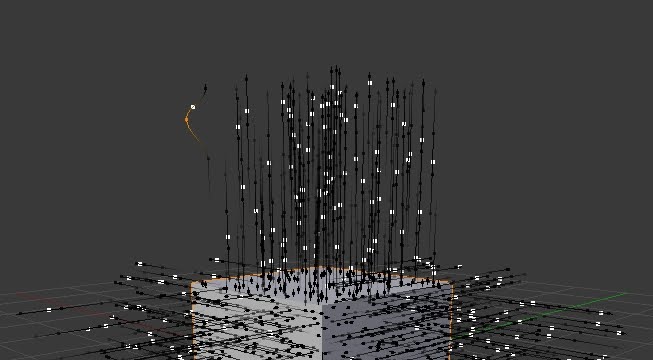
First non-hair particles have been edited in particle mode. It's all still buggy as hell, but I've got a feeling it's going to be quite nice :)
Wednesday, August 12, 2009
New point cache file format
First of all sorry for the lack of updates! I've been terribly buzy recently with my master's thesis, but now have some new code ready.
Just committed:
My plan is to start working on editable point caches next so expect some fun stuff soon! :)
Just committed:
- New point cache file format (see details from commit message)
- For loading external particle caches only "location" data is strictly nescessary, other needed values can be determined from the given data.
- This will make editable point caches possible hopefully in the near future.
- Non-dynamic data (like particle times)are written automatically when baking to disk so basically a library of particle simulations should be possible.
- Old disk cache format is supported for reading, so pre 2.5 files shouldn't break. However old style memory cache (added during 2.5 development) is not supported. To keep memory cached simulations convert the cache to disk cache before svn update and save the blend.
- Every frame is not necessary since data is interpolated for the inbetween frames.
- Multiple point caches per dynamics system.
- In the future these will hopefully be nla editable etc, but for now things are simple and the current (selected) point cache is used.
- Changing the amount of cached points (for example particle count) is allowed, but might not give correct results if multiple caches are present.
- Generalization of point cache baking etc operator & rna code.
- Comb brushing particle hair didn't work smoothly.
My plan is to start working on editable point caches next so expect some fun stuff soon! :)
Thursday, July 23, 2009
External point caches
- External files should be named "identifier_frame_index.bphys" or "identifier_frame.bphys" where:
- "identifier" is a freely choseable name.
- "frame" is the cached frame number.
- Six digits padded with zeros!, for example "000024".
- "index" can be used to tell caches with the same identifier apart.
- Two digits starting from zero.
- The index and the underscore before are optional. If no index is present the index number in ui should be set to -1.
- Cache file format is pure floating point numbers (in binary, not text!) with each particle's data one after the other with the following data members:
- 3 floats: particle's location vector
- 3 floats: particle's velocity vector
- 4 floats: particle's rotation quaternion
- 3 floats: particle's angular velocity vector
- 1 float: frame of the actual data (this can be non-integer for particles that are born or die between two integer frames, but otherwise should be the same as the "frame" in the file name)
- Cache files don't have to exist for each frame.
- Frames without actual data are interpolated from surrounding frames that have data.
- For now, the external cache panel has controls for particle emission start, end, lifetime and random lifetime. These should be set according to the original simulation data. These will go away in the future when cache files can hold the needed additional data.
Tuesday, July 21, 2009
Boids are back
Just committed:
Initial code for boids v2
Too many new features to list! But here are the biggies:
Initial code for boids v2
Too many new features to list! But here are the biggies:
- Boids can move on air and/or land, or climb a goal object.
- Proper interaction with collision objects.
- Closest collision object in negative z direction is considered as ground.
- Other collision objects are obstacles and boids collide with them.
- Boid behavior rules are now added to a dynamic list.
- Many new rules and many still not implemented.
- Different rule evaluation modes (fuzzy, random, average).
- Only particle systems defined by per system "boid relations" are considered for simulation of that system.
- This is in addition to the boids own system of course.
- Relations define other systems as "neutral", "friend" or "enemy".
- All effectors now effect boid physics, not boid brains.
- This allows forcing boids somewhere.
- Exception to this is new "boid" effector, which defines boid predators (positive strength) and goals (negative strength).
Boids are nowhere near finished yet, but at least now there's something to play with. I'll make some tutorial vids later on, but for now the best advice I can give you guys is:
- Reduce particles amount
- Set particle life time & size bigger
- Set physics to boids
- Set gravity to something negative
- Go wild and experiment!
Tuesday, July 14, 2009
Keyed physics demystified
P.S. Our two cats went crazy around 4:35 so try not to mind the distracting noise :)
Monday, July 13, 2009
Keyed physics
I think keyed particles are one of the most misunderstood features of particles. This is probably due to the very cryptic way in which keyed physics were presented in the ui before, so I decided to make things a bit easier.
Just committed...
Keyed physics refresh:
- Keyed targets in one list instead of "chaining", this opens up many more possibilities than before and is much less obscure.
- Better keyed timing possibilities (time & duration in frames).
- Looping over keyed targets list.
Other changes (this is for you pino :))
- New child setting "length" with threshold (great for guard & underfur with a single particle system)
Note to John E.
The new keyed particles allow for the effect you showed in your vid. Just create a particle system with newtonian physics for the deformed cube object with suitable random velocity and gravity etc. Then create a particle system with keyed physics to the non-deformed cube and add two keys to the keyed targets list. The first key is by default the emitter object, so all you need to do is set the second target object to be the deformed cube object. As the last step activate keyed timing and set the time of the second target to something around 10 frames to get nearly the exact effect you were looking for :)
Just committed...
Keyed physics refresh:
- Keyed targets in one list instead of "chaining", this opens up many more possibilities than before and is much less obscure.
- Better keyed timing possibilities (time & duration in frames).
- Looping over keyed targets list.
Other changes (this is for you pino :))
- New child setting "length" with threshold (great for guard & underfur with a single particle system)
Note to John E.
The new keyed particles allow for the effect you showed in your vid. Just create a particle system with newtonian physics for the deformed cube object with suitable random velocity and gravity etc. Then create a particle system with keyed physics to the non-deformed cube and add two keys to the keyed targets list. The first key is by default the emitter object, so all you need to do is set the second target object to be the deformed cube object. As the last step activate keyed timing and set the time of the second target to something around 10 frames to get nearly the exact effect you were looking for :)
Subscribe to:
Posts (Atom)